

Description
Product Overview
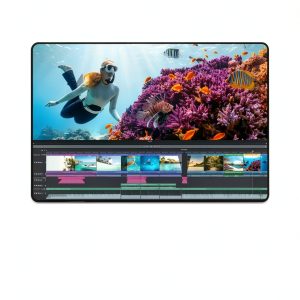
Pinnacle Studio 25 is a full‑featured video editing solution designed for a single user on Windows PCs. It combines an intuitive timeline with unlimited video and audio tracks, a library of creative effects, and advanced color grading tools. The software supports virtually all common video, audio, and image formats, ensuring you can work with footage from cameras, smartphones, and drones without conversion hassles. Its customizable workspace lets you arrange panels, set shortcut keys, and save layout presets to match your personal editing style.
![[Product front view showing all components]](https://www.mintiq.store/wp-content/uploads/2026/05/e329b5d125a644babc829dc3f4a1984b.jpg)
Usage
Whether you are producing a family vacation montage, a YouTube tutorial, or a short film, Pinnacle Studio 25 adapts to any creative scenario. The multi‑camera editing feature simplifies syncing footage from multiple angles, while screen recording tools make it ideal for software demos and gaming videos. Its stop‑motion animation module lets hobbyists craft frame‑by‑frame projects, and the motion tracking utility adds dynamic titles that follow moving subjects. The software is optimized for Intel‑based PCs, delivering smooth playback even with high‑resolution 4K clips.
Why Choose Us
Pinnacle Studio 25 stands out with its blend of professional capabilities and user‑friendly design. Every tool—from video masking to selective color correction—is built for precision without a steep learning curve. Regular updates ensure compatibility with the latest codecs and operating system enhancements. Our dedicated support team offers responsive assistance, tutorials, and a vibrant community forum to help you master advanced techniques quickly.
Key Features
- Unlimited tracks let you layer video, audio, and effects without restrictions.
- Hundreds of creative effects and filters make your footage stand out instantly.
- Advanced keyframing gives precise control over motion, opacity, and color changes.
- Customizable workspace and shortcut keys speed up your editing workflow.
- 24/7 customer support and extensive online tutorials ensure you’re never stuck.
FAQ
Can I edit 4K video with Pinnacle Studio 25?
Yes, the software supports 4K resolution and provides smooth playback with hardware‑accelerated rendering on compatible Intel‑based PCs.
Is there a trial version available?
A free 30‑day trial can be downloaded from the official website, giving full access to all features.
What audio formats are supported?
Pinnacle Studio 25 handles MP3, WAV, AAC, FLAC and many other common audio formats for seamless soundtrack integration.
Can I use the software for commercial projects?
Yes, the license permits both personal and commercial use, allowing you to sell videos created with the program.
How does the screen recording feature work?
The built‑in screen recorder captures high‑quality video of your desktop, ideal for tutorials, webinars, and gaming highlights.




Reviews
There are no reviews yet.